
WordPress website मे लगाए rating option बिना plugins के ।
आप अपने वॉर्डप्रेस वेबसाईट मे यूजर का rating देने वाले ऑप्शन को लगा सकते है । आपकी वेबसाईट मे कोई भी User एक बार से ज्यादा रेटिंग नही दे सकता है । rating option से आपके website को rank होने की आशंका थोड़ी बढ़ सकती है ।
ध्यान रहे rating वाला option लगाने से पहले ये पता कर लेना की rating वाला schema markup कौन से schema मे काम करता है । यह rating funcatiolity सिर्फ music वाले schema मे काम करता है । अगर आप चाहते है की rating वाला option आपकी किसी भी तरह की वेबसाईट मे काम करे तो आप नीचे दिए कोड से हरे रंग वाले कोड को मिटा सकते है ।
कैसे करें
सबसे पहले आप अपनी wrodpress वेबसाईट के functions.php मे नीचे दिए हुए कोड जो paste कर दें ।
//Star Rating
/* =====================================================
* AJAX: SAVE RATING (MILLION SAFE – COUNT BASED)
* ===================================================== */
add_action('wp_ajax_save_post_rating', 'save_post_rating');
add_action('wp_ajax_nopriv_save_post_rating', 'save_post_rating');

function save_post_rating() {

$post_id = (int) $_POST['post_id'];
$rating = (int) $_POST['rating'];

if (!$post_id || $rating < 1 || $rating > 10) {
wp_send_json_error('invalid');
}

// cookie protection (DB clean rahe)
if (isset($_COOKIE['rated_' . $post_id])) {
wp_send_json_error('already_voted');
}

// get rating counts
$counts = get_post_meta($post_id, '_rating_counts', true);
if (!is_array($counts)) {
$counts = array_fill(1, 10, 0);
}

// increment
$counts[$rating]++;

// calculate average
$total_votes = array_sum($counts);
$total_score = 0;

foreach ($counts as $star => $count) {
$total_score += ($star * $count);
}

$avg = round($total_score / $total_votes, 1);

// save meta (constant size)
update_post_meta($post_id, '_rating_counts', $counts);
update_post_meta($post_id, '_rating_total', $total_votes);
update_post_meta($post_id, '_rating_avg', $avg);

// cookie 90 days
setcookie('rated_' . $post_id, 1, time() + (90 * DAY_IN_SECONDS), '/');

wp_send_json_success([
'avg' => $avg,
'count' => $total_votes
]);
}

/* =====================================================
* SHORTCODE: RATING BOX
* ===================================================== */
function imdb_million_safe_rating() {
global $post;

$avg = get_post_meta($post->ID, '_rating_avg', true);
$count = get_post_meta($post->ID, '_rating_total', true);

$avg = $avg ?: 0;
$count = $count ?: 0;

// cookie check (important)
$voted = isset($_COOKIE['rated_' . $post->ID]) ? 1 : 0;

ob_start(); ?>

<div class="post-rating"
data-post="<?php echo esc_attr($post->ID); ?>"
data-avg="<?php echo esc_attr($avg); ?>"
data-voted="<?php echo esc_attr($voted); ?>">

<div class="stars">
<?php for ($i = 1; $i <= 10; $i++): ?>
<span class="star" data-value="<?php echo $i; ?>">★</span>
<?php endfor; ?>
</div>

<div class="rating-info">
<?php echo $count
? "⭐ {$avg}/10 ({$count} votes)"
: "Be the first to rate"; ?>
</div>
</div>

<?php
return ob_get_clean();
}
add_shortcode('post_rating', 'imdb_million_safe_rating');


/* =====================================================
* SCHEMA.ORG AGGREGATERATING (SEO)
* ===================================================== */
add_action('wp_head', function () {

if (!is_single()) return;

global $post;
$avg = get_post_meta($post->ID, '_rating_avg', true);
$count = get_post_meta($post->ID, '_rating_total', true);

if (!$avg || !$count) return;
?>
<script type="application/ld+json">
{
"@context": "https://schema.org",
"@type": "CreativeWork",
"name": "<?php echo esc_js(get_the_title()); ?>",
"url": "<?php echo esc_url(get_permalink()); ?>",
"aggregateRating": {
"@type": "AggregateRating",
"ratingValue": "<?php echo esc_js($avg); ?>",
"bestRating": "10",
"worstRating": "1",
"ratingCount": "<?php echo esc_js($count); ?>"
}
}
</script>
<?php
});
अब footer.php मे नीचे दिए हुए कोड को पेस्ट कर दें ।
<script>

document.addEventListener('DOMContentLoaded', function () {
    const ajaxUrl = '/wp-admin/admin-ajax.php';
    document.querySelectorAll('.post-rating').forEach(box => {
        const stars = [...box.querySelectorAll('.star')];
        const info  = box.querySelector('.rating-info');
        const avg   = Math.round(parseFloat(box.dataset.avg));
        const voted = box.dataset.voted === '1';

        /* ===============================
         * IF USER ALREADY VOTED
         * =============================== */
        if (voted && avg > 0) {
            stars.forEach(s => {
                if (+s.dataset.value <= avg) {
                    s.classList.add('filled');
                }
                s.style.pointerEvents = 'none';
            });
            return; // no hover, no click
        }

        /* ===============================
         * NEW VISITOR → CLEAN STARS
         * =============================== */

        stars.forEach((star, index) => {
            star.addEventListener('mouseenter', () => {
                stars.forEach((s, i) =>
                    s.classList.toggle('hovered', i <= index)
                );
            });
            star.addEventListener('mouseleave', () => {
                stars.forEach(s => s.classList.remove('hovered'));
            });
            star.addEventListener('click', () => {
                fetch(ajaxUrl, {
                    method: 'POST',
                    headers: {'Content-Type': 'application/x-www-form-urlencoded'},
                    body:
                      `action=save_post_rating&post_id=${box.dataset.post}&rating=${star.dataset.value}`
                })
                .then(r => r.json())
                .then(res => {
                    if (!res.success) {
                        alert(
                          res.data === 'already_voted'
                          ? 'You have already voted'
                          : 'Something went wrong'
                        );
                        return;
                    }
                    alert('Thank you for your vote!');
                    info.textContent =
                       `⭐ ${res.data.avg}/10 (${res.data.count} votes)`;
                    stars.forEach(s => {
                        s.classList.toggle(
                            'filled',
                            +s.dataset.value <= Math.round(res.data.avg)
                        );
                        s.style.pointerEvents = 'none';
                        s.classList.remove('hovered');
                    });
                });
            });
        });
    });
});
</script>

<style>
.post-rating { margin: 15px 0; }
.stars { font-size: 22px; }
.star {
    color: #ccc;
    cursor: pointer;
    transition: .2s;
}
.star.hovered,
.star.filled {
    color: #f5c518; /* IMDb yellow */
}
.rating-info {
    margin-top: 6px;
    font-size: 14px;
    color: #555;
}
</style>
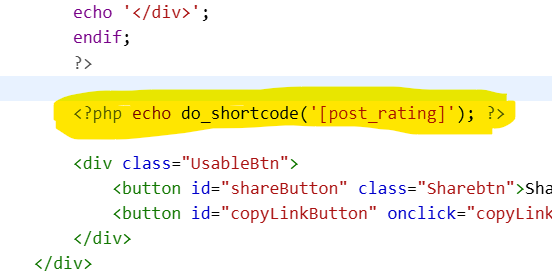
अब आपको rating वाले ऑप्शन को जहा भी दिखाना हो वह पे shortcode को पेस्ट कर दें ।
इस तरह से आप अपनी वेबसाईट मे rating देने वाले ऑप्शन को लगा सकते है और बिना किसी plugins के ऐसा आप कर रकते हैं ।